Simple Mail Transfer Protocol (SMTP)
Simple Mail Transfer Protocol (SMTP) |
| Home | Protocols | | |
Simple Mail Transfer Protocol (SMTP) is the basis of Internet e-mail. Its objective is to transfer mail reliably and efficiently. SMTP is the IETF's Standard Number 10, or STD0010. Standard e-mail formats are also closely related to the SMTP standard.
E-mail was the first "killer app" on the ARPANET, and SMTP was the scalable, standardized way to transport that e-mail. Its popularity helped drive adoption of TCP/IP and the Internet. SMTP has scaled very well indeed: the basic protocol is still in use 22 years after its standardization and is used by more than 500 million people around the world!
This page will show the history of e-mail and key developments in e-mail history. There will also be discussion and links for particularly important milestones.
Rides on top of TCP, although it will run over others, such as X.25.
25 SMTP
587 Submission (e-mail submission via SMTP on port 587)
Both available.
Work on network mail began in 1971 over NCP on ARPANET (pre-IP). RFCs 196, 221, 224, and 278 (all in 1971) dealt with the Mail Box Protocol, a system running over NCP/DTP or NCP/FTP and allowing an ASCII text document to be printed or stored as a file on a remote host. MBP was a subset of FTP.
1973 saw a flurry of RFC activity to refine electronic mail over the ARPANET. Electronic mail was widely used on the ARPANET by this time. Mail was handled through FTP commands MAIL and MLFL. RFCs 453, 456, 458, 469, 475, 498, and 510 refined mail protocols and operations. RFC 469 standardized the "user@host" addressing method.
RFC 524 (Mail Protocol, or MP) was an attempt to further define and standardize electronic mail, still making the protocol a part of FTP. It addressed forwarding mail, replying to mail, mail acknowledgement, and author verification.
RFC 539 was Dr. Jonathan Postel's first forray into electronic mail. It was a response to RFC 524. RFC 555 was a response to Postel's response.
From 1974 to 1980, these RFCs about mail protocols were issued: RFC 630, 644, 720, 751, 754, 763, and
771. Notable among these were:
RFC 644 - addressing how to authenticate e-mail signatures
RFC 771 - How to transition existing e-mail protocols and systems from ARPANET/NCP to Internet/TCP.
Modern SMTP protocol begins in 1980 in an RFC by Dr. Jon Postel. RFC 772, Mail Transfer Protocol was an attempt at making a mail protocol that was independent of FTP. It is this RFC that will evolve into the first killer app, SMTP e-mail. MTP used port/socket 57, and had 3-digit response codes. It was designed to be independent of the network and transport layers, and work between different operating systems.
RFC 773 - Comments on the mail transition strategy outlined in RFC 771. RFC 780 (1981) MTP refined (Postel) RFC 784, 785, and 786 (1981) dealt with implementing MTP on a DEC TOPS-20 operating system. RFC 788 (1981) - Postel introduces SMTP, the Simple Mail Transfer Protocol. It will run on port/socket 25 and contains all the basic commands that are used today.
RFC 799 (1981) is also very important in its relationship to mail, since it discusses moving to a hierarchical name space (Internet Name Domains) and the implications for e-mail and e-mail addressing.
RFC 805 (1982) were notes from a big meeting on computer mail. The most important outcome of this meeting was a consensus on using the [email protected] addressing scheme.
RFC 807 - Multimedia mail meeting notes RFC 808 - Summary of a computer mail services meeting in 1979
Then came the modern era of SMTP e-mail, with the standardization of RFC 821 (SMTP) and RFC 822 (Internet mail format).
Here were the original commands for the SMTP protocol:
Command set from RFC 821:

HELO domain
MAIL FROM: reverse-path
RCPT TO: forward-path
DATA
RSET
SEND FROM: reverse-path
SOML FROM: reverse-path
SAML FROM: reverse-path
VRFY string
EXPN string
HELP [string]
NOOP
QUIT
TURN

A minimum implementation must contain these SMTP "verbs":

HELO
MAIL
RCPT
DATA
RSET
NOOP
QUIT
After RFC 821 and RFC 822, more than 60 RFCs have been published concerning SMTP, e-mail formats, e-mail security, and other core e-mail concerns. This does not include POP, IMAP, or PCMAIL! This continuing development has improved the reliability, functionality, performance, and security of e-mail. Here is a list of the basic categories of post-RFC 821 e-mail RFCs:
Perhaps the most important changes to Internet e-mail were the standardization of MIME, which allowed multiple attached files of different kinds to be sent via SMTP, and SMTP Service Extensions (ESMTP).
RFC 0821   Simple Mail Transfer Protocol (STD0010)           1982
RFC 0822   Internet Message Format (STD0011)                 1982
RFC 1123   Requirements for Internet Hosts (STD0003)         1989
RFC 1652   SMTP Extension for 8bit-MIME                      1994
RFC 1869   SMTP Service Extensions (ESMTP)                   1995
RFC 1870   SMTP Extension for Msg. Size Declaration          1995
RFC 1985   SMTP Extension for Remote Message Queue Starting  1996
RFC 2034   SMTP Extension for Enhanced Error Codes           1996
RFC 2045   Multipurpose Internet Mail Extensions (MIME) #1   1996
RFC 2046   Multipurpose Internet Mail Extensions (MIME) #2   1996
RFC 2047   Multipurpose Internet Mail Extensions (MIME) #3   1996
RFC 2048   Multipurpose Internet Mail Extensions (MIME) #4   1996
RFC 2049   Multipurpose Internet Mail Extensions (MIME) #5   1996
RFC 2142   Mailbox Names for Common Services and Roles       1997
RFC 2183   Content-Disposition Header Field                  1997
RFC 2298   Message Disposition Notifications                 1998
RFC 2476   Message Submission                                1998
RFC 2505   Anti-Spam Recommendations for SMTP MTAs           1999
RFC 2554   SMTP Service Extension for Authentication         1999
RFC 2821   Simple Mail Transfer Protocol                     2001
RFC 2822   Internet Message Format                           2001
RFC 2920   SMTP Extension for Command Pipelining (STD0060)   2000
RFC 3030   SMTP Extensions for Large and Binary MIME         2000
RFC 3207   SMTP Extension for Secure SMTP over TLS           2002
RFC 3461   SMTP Extension for Delivery Status Notifications  2003
RFC 3463   Enhanced Mail System Status Codes		     2003
Internet e-mail systems can be described in generic terms, which is helpful in understanding basic e-mail concepts. The X.400 MHS terminology is frequently used. X.400 was an OSI architecture for electronic messaging. It never caught on the way SMTP e-mail did, but the terminology is still useful:
An originator prepares messages with the assistance of his or her User Agent (UA). A UA is an application process that interacts with the Message Transfer System (MTS) to submit messages. The MTS delivers to one or more recipient UAs the messages submitted to it.
The MTS is composed of a number of Message Transfer Agents (MTAs). Operating together, the MTAs relay messages and deliver them to the intended recipient UAs, which then make the messages available to the intended recipients.
The collection of UAs and MTAs is called the Message Handling System (MHS). The MHS and all of its users are collectively referred to as the Message Handling Environment.
The terms below are more commonly used today when discussing e-mail protocols, applications, and models:
A process which acts (usually on behalf of a user) to compose and submit new messages, and process delivered messages. In the split- MUA model, POP or IMAP is used to access delivered messages.
A process which conforms to [SMTP-MTA], which acts as an SMTP server to accept messages from an MSA or another MTA, and either delivers them or acts as an SMTP client to relay them to another MTA.
A process which conforms to this specification, which acts as a submission server to accept messages from MUAs, and either delivers them or acts as an SMTP client to relay them to an MTA.
The MDA is responsible for the actual delivery of messages into a user's mail box. While this may seem like a frivolous task, the important aspect of this component is that the delivery process is separate from the very complex MTA. The main concept that the MDA defines is the structure of the mail store. Modern MDAs usually include the ability to filter mail and in some cases to reformat its contents.
The MAA is a new component added to the process about 15 years ago. MAAs are to a certain extent an extension of the MDA. MAAs provide remote access to a user's mail. MAAs speak one or more of a variety of Mail Access Protocols. The two most common protocols today are POP3 and IMAP4. These protocols have evolved significantly over time. The key functions of an MAA are to authenticate a user and deliver e-mail, but some MAA's provide a much more sophisticated set of features for accessing one's e-mail.
MTAs speak SMTP or ESMTP. They are essentially mail routers. An Internet MTA is to mail what a router is to IP datagrams. There are only a handful of ISP-scale MTAs, Sendmail, Postfix, and Qmail being the most common at the moment. MTAs can store mail in queue until the destination is available, then send it. Thus, they are sometimes called store-and-forward relays.
Internet SMTP e-mail is highly dependent on DNS. From mail routing to spam-prevention, the DNS system is used extensively. MTAs should have valid DNS A,PTR, and MX records. The MX record is a special record which tells MTAs which SMTP server/mail host to connect to in order to deliver mail to domain X. Multiple MX records can be used for load balancing or redundancy. The lowest number is given the highest priority, SMTP MTAs will attempt to deliver there first. Below, you can see an example of mail routing from [email protected] to [email protected]. Detailed explanation follows the picture:
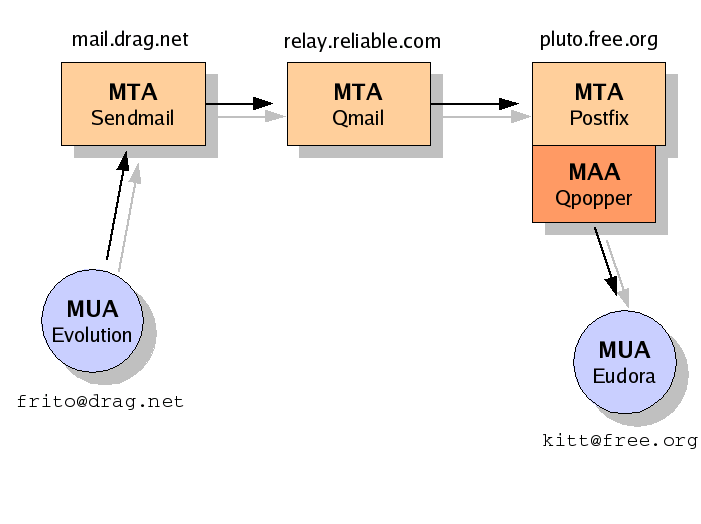
User "frito" has drafted an e-mail to his friend, [email protected]. He wrote the e-mail using Evolution, a popular open source graphical e-mail client, or MUA. He had to manually configure the address for his ISP's outgoing SMTP mail relay. He must use this relay, the ISP will not allow outbound SMTP traffic to other mail relays.
Once the e-mail arrives at his ISP's mail relay, mail.drag.net, it is put in a queue for delivery. This particular MTA is Sendmail, the Internet's old e-mail workhorse. In order to forward the mail to the proper destination, the MTA must perform a DNS lookup for free.org's MX records. It receives the following info:
;; ANSWER SECTION:

free.org.           3600    IN      MX      10 pluto.free.org.
free.org.           3600    IN      MX      20 relay.reliable.com.
Mail.drag.net first tries to establish an SMTP connection to the lowest-numbered Mail eXchanger, pluto.free.org. However, there is a temporary network outage and it is unable to connect. Next, it will try to connect to the "secondary" Mail eXchanger, relay.reliable.com. Relay.reliable.com has been configured to act as a backup store-and-forward mail relay for the free.org domain.
Mail.drag.net is able to successfully connect to relay.reliable.com, and sends the message via the SMTP protocol. Relay.reliable.com is running Qmail.
Now, on relay.reliable.com, DNS is consulted. Qmail removes itself from the list and tries to deliver to the remaining Mail eXchanger, pluto.free.org. It continues trying until the network outage is repaired, then connects via SMTP and delivers the message to pluto.
Once pluto (which is running Postfix) has the message, it will store the mail in user kitt's mailbox file. Kitt will fire up his MUA (Eudora on Mac OS 9), and connect to pluto's MAA, which is a Qpopper POP3 server. The message will be retrieved and then deleted.
The mail went through 3 differenet MTAs in its journey to the recipient. Each one will be listed iin the e-mail's header. Note that the clients were running on different Operating Systems, the MTAs were different UNIX/Linux platforms, and the MTAs were all different. It still worked, because it was designed to be platform independent, vendor independent, and non-commercial.
Here is a summary of current current SMTP commands and responses:
Commands:

EHLO domain
HELO domain (still supported for backward compatibility)
MAIL FROM: reverse-path [mail-parameters]
RCPT TO: forward-path [mail-parameters]
DATA
RSET
SEND FROM: reverse-path
SOML FROM: reverse-path
SAML FROM: reverse-path
VRFY string
EXPN string
HELP [string]
NOOP [string]
QUIT

Commands and Features from RFC 821 that should no longer be used:
Source Routing
TURN
SEND
SAML
SOML

A minimum implementation must contain these SMTP "verbs":

EHLO
HELO
MAIL
RCPT
DATA
RSET
NOOP
QUIT
VRFY
The service extensions are identified by keywords sent from the server to the client in response to the EHLO command.
Here is a list of current SMTP Extended Commands:
Keywords            Description                              Reference
------------        --------------------------------         ---------
SEND                Send as mail                             [RFC821]
SOML                Send as mail or terminal                 [RFC821]
SAML                Send as mail and terminal                [RFC821]
EXPN                Expand the mailing list                  [RFC821]
HELP                Supply helpful information               [RFC821]
TURN                Turn the operation around                [RFC821]
8BITMIME            Use 8-bit data                           [RFC1652]
SIZE                Message size declaration                 [RFC1870]
VERB                Verbose                                  [Eric Allman]
ONEX                One message transaction only             [Eric Allman]
CHUNKING            Chunking                                 [RFC3030]
BINARYMIME          Binary MIME                              [RFC3030]
CHECKPOINT          Checkpoint/Restart                       [RFC1845]
PIPELINING          Command Pipelining                       [RFC2920]
DSN                 Delivery Status Notification             [RFC1891]
ETRN                Extended Turn                            [RFC1985]
ENHANCEDSTATUSCODES Enhanced Status Codes                    [RFC2034]
AUTH                Authentication                           [RFC2554]
STARTTLS            Start TLS                                [RFC3207]
The extensions are registered through IANA. You can always retrieve a current list from http://www.iana.org/assignments/mail-parameters
Every command must generate exactly one reply. The SMTP reply consists of a 3-digit number followed by some text. The number is used by mail software to determine what state to enter next; the text is meant for the human user.
Here is list of standard reply codes:
211  System status, or system help reply
214  Help message [this reply is useful only to the human user]
220  <domain> Service ready
221  <domain> Service closing transmission channel
250  Requested mail action okay, completed
251  User not local; will forward to <forward-path>
252  Cannot VRFY user, but will accept message and attempt delivery

354  Start mail input; end with <CRLF>.<CRLF>

421  <domain> Service not available, closing transmission channel
450  Requested mail action not taken: mailbox unavailable
451  Requested action aborted: local error in processing
452  Requested action not taken: insufficient system storage

500  Syntax error, command unrecognized
501  Syntax error in parameters or arguments
502  Command not implemented
503  Bad sequence of commands
504  Command parameter not implemented
550  Requested action not taken: mailbox unavailable
551  User not local; please try <forward-path>
552  Requested mail action aborted: exceeded storage allocation
553  Requested action not taken: mailbox name not allowed
554  Transaction failed
If you are using ESMTP with Enhanced Status Codes, then more detailed responses are available. See RFC 3463 for details.
Sendmail and Postfix are the most common MTAs included with modern GNU/Linux distributions, although Debian comes with Exim.
In recent years, most MUAs (mail clients) have the capability to send authenticated and encrypted e-mail. This is done via the STARTTLS mechanism on port 25 or 587. Once a TLS session is started, a username and password can be sent to the server. If the credentials check out O.K., the mail will be accepted for delivery. The number one reason for using SMTP AUTH is to allow remote/mobile/home users to send/transmit/upload e-mail from the Internet without requiring that the MTA be an open relay for spammers. STARTTLS is used to encrypt the username and password, so that it cannot be sniffed. Although some people point to TLS as providing encryption of content as well, this is not a good assumption to make. The unencrypted e-mail may be forwarded through several other hosts and networks over which you have no control. If you require end-to-end e-mail encryption, you should use S/MIME or OpenPGP/GnuPG.
Configuring the right TLS/SSL type, ports, and auth types can be a painful chore. Fortunately, many clients can automatically test "what the server supports" to make configuration a little bit easier. At the time of this writing, MUAs such as Mozilla Mail, Evolution, Balsa, Opera M2, Outlook Express, Netscape Mail, KMail, and Sylpheed all supported sending SMTP mail with TLS/SSL and authenticating with username and password. Many SASL options are available for authentication, but PLAIN and LOGIN are the most common type to use with TLS/SSL. If you are NOT using TLS/SSL, CRAM-MD5 and DIGEST-MD5 will protect your password from packet sniffers.
SMTP works well through firewalls and NAT/PAT devices such as cheap SOHO router and security devices. Traffic is initiated by SMTP clients to SMTP servers, from random non-priviledged ports to well-known TCP ports. You will probably only need to worry about TCP port 25, although you may have to deal with TCP ports 587 and 465. TCP 587 is the mail submission port, which can be handy for bypassing ISP blocking of port 25 traffic, and 465 is the deprecated SMTPS (SMTP over SSL/TLS) port. Fortunately, most mail client and mail server vendors support the standard STARTTLS method on port 25, and 465 is not required.
One item to note is that some firewalls and packet filters actually look at and interfere with SMTP traffic. For example, Cisco's PIX firewall by default only allows RFC-821 minimal commands. Even some Linksys SOHO firewalls will block ESMTP commands like EHLO. If you need/want to use standard ESMTP commands like STARTTLS, 8BITMIME, BINARYMIME, or AUTH, then you will need to configure your firewall to not interfere with SMTP traffic, or select a different type of firewall device that will support ESMTP.
All SMTP MTAs can act as clients and servers. Virtually every graphical MUA uses SMTP to transmit/send e-mail to an ISP's mail relay/SMTP server/MTA or an organization's MTA. The user typically has to manually input the mail server name or IP address in account preferences or settings. In many cases, the mail can be submitted to port 25 or 587 (submission), with or without encyrption via STARTTLS. The MUA usually retrieves mail via IMAP or POP3.
The links below will take you to step-by-step instructions for installing, configuring, and using a POP3 server: